From Ideas to Precision: Why I Use Mermaid with LLMs
Image generation is messy for structure. With Mermaid + LLMs, diagrams become clear, tweakable, and practical. A real tool for strategy and logic.


In my work as a digital and AI strategist, I spend a lot of time analysing complex information: policies, processes, data flows, client interactions. The challenge is not just understanding it myself, but making sure everyone around the table sees the same structure.
Visualisation helps. A flowchart can clarify a process, a sequence diagram can capture how systems interact, and a classification chart can sort concepts into clear categories.
These diagrams act as shortcuts: they reduce ambiguity, improve communication with clients, and give implementers a clearer sense of the logic behind a system.


Why not image generation?
AI image generation is impressive when you need something atmospheric or loosely structured. But when it comes to precision, diagrams, tables, graphs, I’ve found it messy and impractical.
The results look nice but are hard to adapt, impossible to maintain, and too fragile for real collaboration.
Why Mermaid works
With Mermaid the process shifts. Instead of drawing shapes directly, you capture the logic in text, and the rendering engine produces clean, consistent visuals that can be refined with minimal effort.
When paired with a large language model, whether ChatGPT or the AI module in MermaidChart, the step from natural language to exact structure becomes almost seamless. What once demanded technical fluency now feels like a conversational act, bringing precision within reach of anyone working with ideas.
This makes the work both highly functional and surprisingly enjoyable. It feels like craftsmanship. The way a carpenter shapes wood, first understanding its grain and potential, then turning it into something precise and useful, Mermaid allows me to take a rough idea and refine it into a clear, structured form.
Tools that fit
It might only be a matter of time before LLMs integrate something like Mermaid directly. Perhaps it’s already happening. But I like having a dedicated tool for it, and I personally use Mermaid Chart, which I can warmly recommend.
It’s lightweight, focused, and gets out of the way so I can focus on the thinking.
Closing thought
For me, this combination bridges the gap between concept and precision. It clears the mind, sharpens the idea, and leaves me with something that both I and my clients can rely on. And that, in the world of digital strategy and AI, is worth a lot.
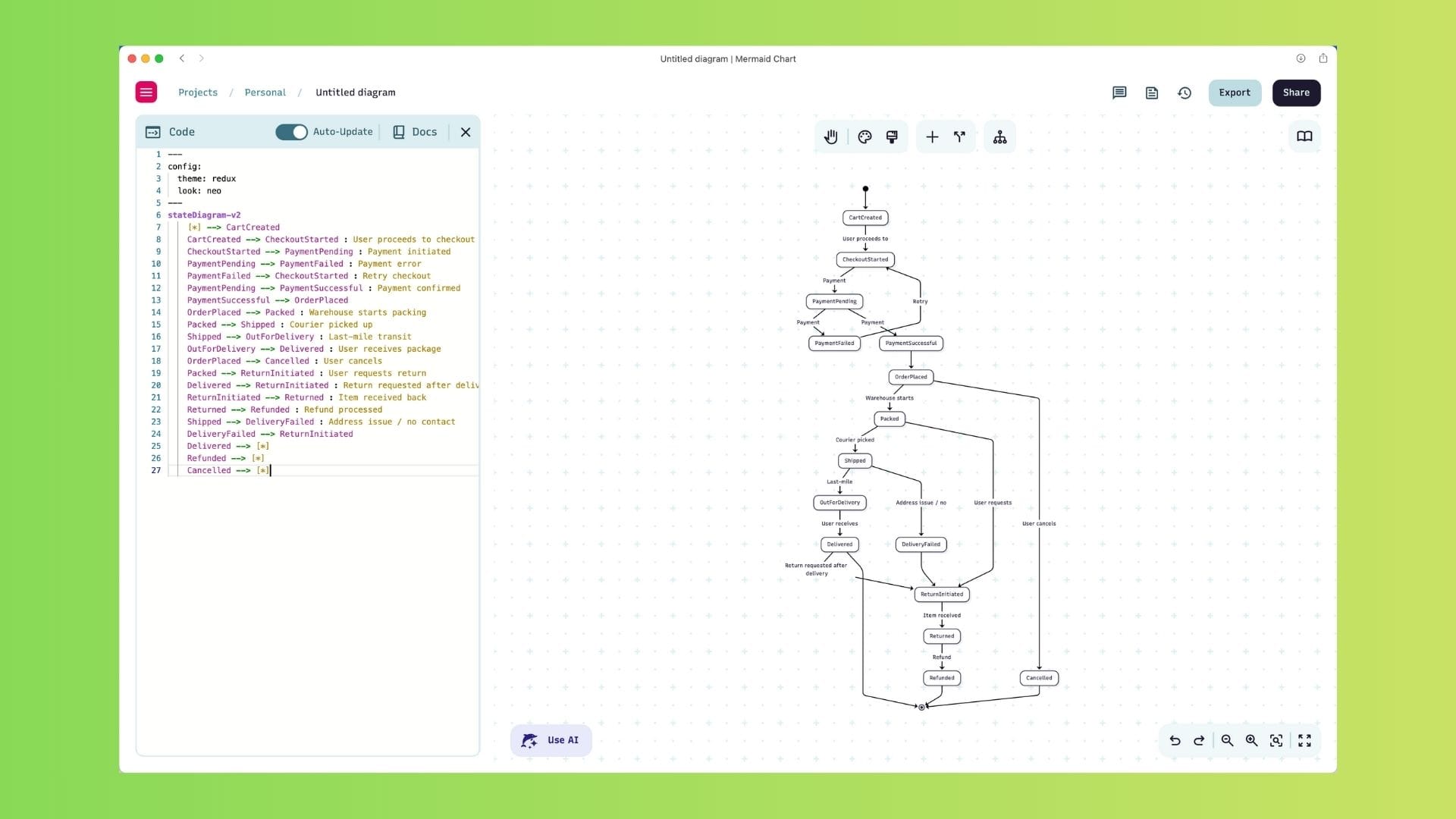
I demo Mermaid as GPT and as application (with AI)


Example mermaid script as seen on screenshot
---
config:
  theme: redux
  look: neo
---
stateDiagram-v2
    [*] --> CartCreated
    CartCreated --> CheckoutStarted : User proceeds to checkout
    CheckoutStarted --> PaymentPending : Payment initiated
    PaymentPending --> PaymentFailed : Payment error
    PaymentFailed --> CheckoutStarted : Retry checkout
    PaymentPending --> PaymentSuccessful : Payment confirmed
    PaymentSuccessful --> OrderPlaced
    OrderPlaced --> Packed : Warehouse starts packing
    Packed --> Shipped : Courier picked up
    Shipped --> OutForDelivery : Last-mile transit
    OutForDelivery --> Delivered : User receives package
    OrderPlaced --> Cancelled : User cancels
    Packed --> ReturnInitiated : User requests return
    Delivered --> ReturnInitiated : Return requested after delivery
    ReturnInitiated --> Returned : Item received back
    Returned --> Refunded : Refund processed
    Shipped --> DeliveryFailed : Address issue / no contact
    DeliveryFailed --> ReturnInitiated
    Delivered --> [*]
    Refunded --> [*]
    Cancelled --> [*]
 Rob Hoeijmakers